FASTEST SCALPING TERMINAL FOR OPTIONS TRADING IN INDIA 2025

True One-Click Power.
Built for Market Domination.

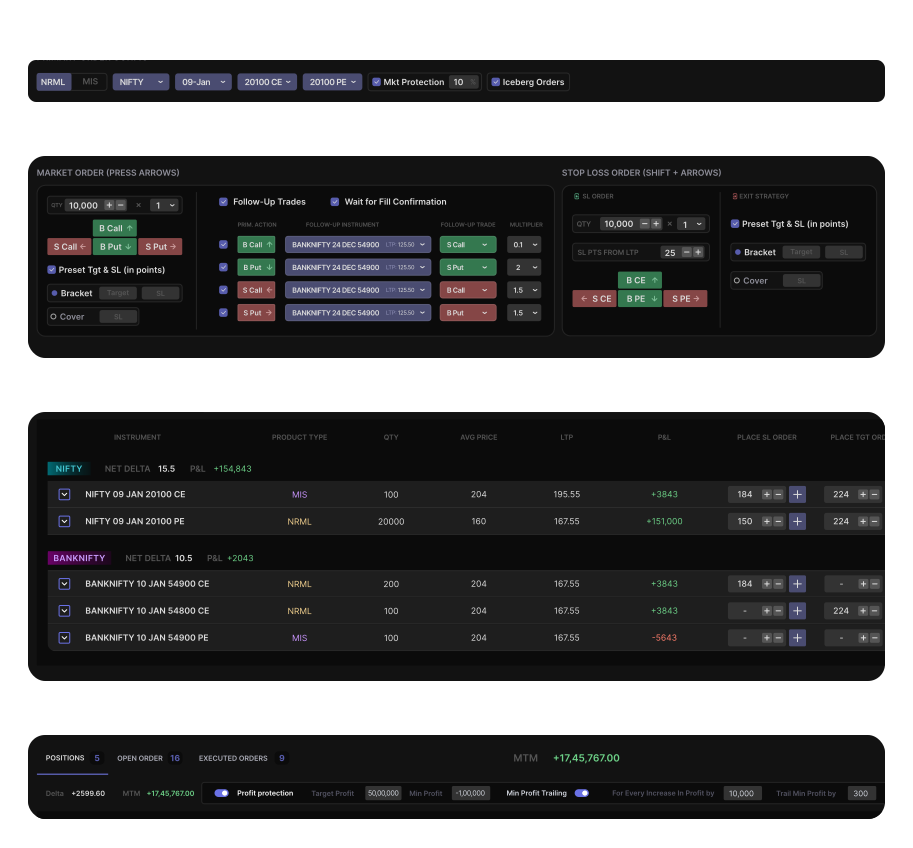
Trade in lakhs quantity, execute in milliseconds. X-Trader puts the entire market at your fingertips — use arrow keys to place orders, Bracket Orders for risk management, and Trailing Stop-Loss to protect profits.

X-Trader scalping terminal interface showing arrow key order placement, position table, and risk management tools

X-Trader: India's Fastest Scalping Terminal

The fastest way to scalp with large quantities in index and stock options. Arrow key trading, Bracket Orders, MTM-based targets & Trailing Stop-Loss.


Single-Screen Interface

Position table, order entry, modification, and execution are accessible on one screen for seamless navigation and faster scalping.

Arrow Key Order Placement

Use Up/Down/Left/Right arrow keys to instantly place Buy/Sell orders for Calls and Puts. The fastest execution method for scalpers.

Fully Keyboard Operated

Use keyboard buttons to buy, sell, modify, cancel, and exit orders with unmatched speed and accuracy—no mouse needed.

Millisecond Execution

Built for scalpers and HNI high-volume traders with lightning-fast execution and minimal latency for competitive edge.

Bracket & Cover Orders

Place Bracket and Cover Orders that automate stop-loss, target, and risk control for faster, safer execution with predefined exits.

MTM/PNL-Based Targets

Set targets and stop-losses based on your overall Mark-to-Market profit/loss. Auto-exit all positions when thresholds are reached.

Trailing Stop-Loss

Automatically trail your stop-loss as profits increase, locking in gains while allowing winners to run—essential for scalping.

Profit Protection

Profit Protection automatically exits all positions when your overall MTM profit reaches a predefined value—disciplined trading automated.

Follow-Up Orders

Placing one order automatically triggers another in a different instrument—perfect for hedging and coordinated index strategies.

What Makes X-Trader the Best Scalping Terminal

Advanced features for professional scalpers who demand speed, control, and automated risk management

Built for high-speed traders who value time and control

Arrow Key Order Placement

Arrow Key Order Placement

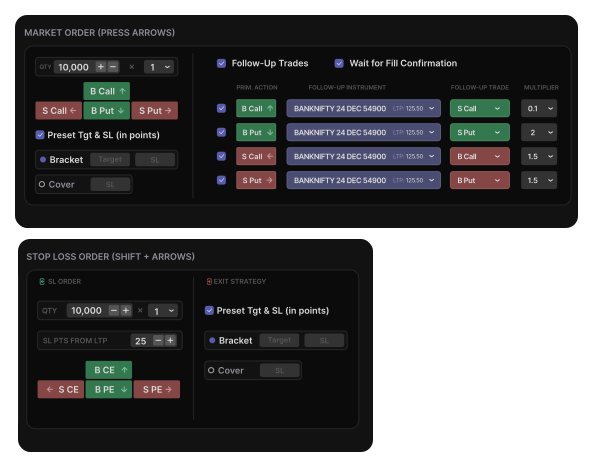
Use Up/Down/Left/Right arrows to instantly place Buy/Sell orders for Calls and Puts with precision and ease.
Shift + Arrow for Stop-Loss

Shift + Arrow for Stop-Loss

Trigger Stop-Loss orders using Shift + Arrow keys—a quick way to add protection without switching context.

Keyboard-Driven Execution

Keyboard-Driven Execution

Use the Tab key to move between sections and input fields, streamlining your entire trading workflow from keyboard.

Keyboard-Driven Order Placement
Intuitive Order Configuration

Intuitive Order Entry Panel

Intuitive Dropdowns

Intuitive Dropdowns

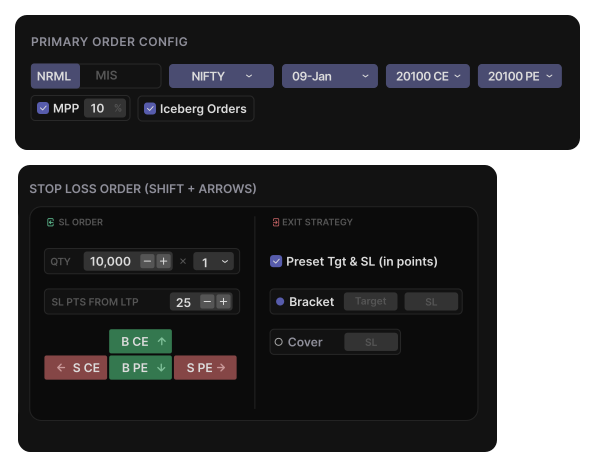
Quickly select instruments, expiry, and strike prices with easy-to-use dropdowns for index and stock options.
Advanced Order Controls

Advanced Order Controls

Enable features like Market Price Protection (MPP) and Iceberg Orders with simple checkboxes to manage risk and visibility.

Customizable Targets & SL

Customizable Targets & SL

Set quantity, apply multipliers, define your target and stop-loss, and execute instantly with a single key press.

Maximize Profits, Minimize Losses

Profit Protection

Profit Protection

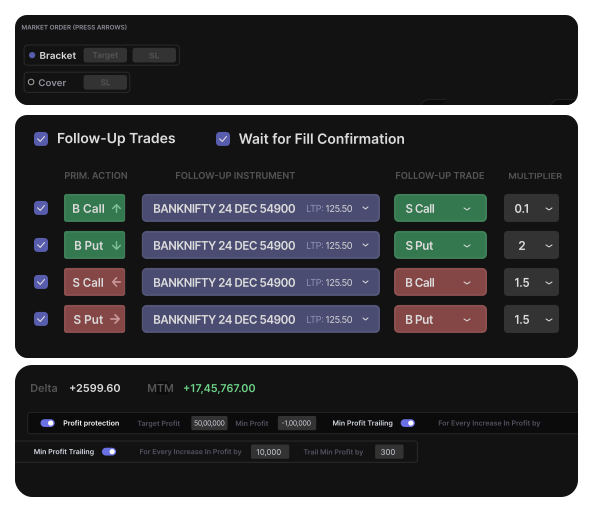
Set maximum and minimum profit thresholds to auto-exit all positions. Trail profits dynamically to secure gains as the market moves in your favor.
Bracket & Cover Orders

Bracket & Cover Orders

Choose Bracket or Cover order type and define stop-loss and target levels upfront to control risk and automate exits with precision.

Follow-Up Orders

Follow-Up Orders

Automatically trigger related trades in other instruments to hedge or capitalize on market movements—perfect for coordinated index strategies.

Automated Risk Management
Position Management

Real-Time Position and Order Management

Easy Tabbed Navigation

Easy Tabbed Navigation

Switch between Position Table, Open Orders, and Executed Orders instantly using intuitive tabs.
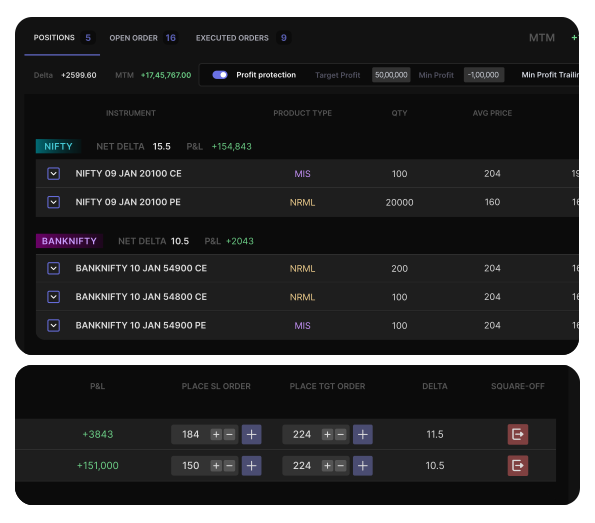
Flexible Order Control

Flexible Order Control

Exit or cancel individual legs or all positions with just a click—no need to switch screens.

Target & SL Per Leg

Target & SL Per Leg

Set or adjust target and stop-loss levels for each position leg to fine-tune your risk management.

Why Elite Traders Trust X-Trader

Before X-Trader, I used to juggle between 3 screens just to place one order. With X-Trader’s all-in-one interface, I now place trades using just arrow keys — it’s become second nature. Execution is lightning-fast, and my focus stays where it should be: on the market.

Ravi S.

Ravi S.

Index Option Trader

Trade smartly and swiftly with
X-Trader

Frequently Asked Questions about X-Trader

What is X-Trader?+

X-Trader is India's fastest scalping terminal designed specifically for options trading. It offers ultra-fast execution using arrow keys, advanced features like Bracket Orders, Cover Orders, MTM/PNL-based targets, Trailing Stop-Loss, and automated risk management tools. Built for professional scalpers and HNI traders who need to trade large quantities with millisecond execution.

Who is X-Trader designed for?+

X-Trader is built for professional scalpers, high net-worth individual (HNI) traders, prop traders, and anyone who requires lightning-fast trade execution with precise control over index and stock options trading. It's perfect for traders who want to scalp Nifty, Bank Nifty, and stock options with large quantities.

How does arrow key order placement work?+

X-Trader allows you to place orders instantly using arrow keys: Up arrow for Buy Call, Down arrow for Sell Call, Left arrow for Buy Put, Right arrow for Sell Put. Combined with Shift key, you can trigger Stop-Loss orders. This keyboard-driven approach enables millisecond execution without touching your mouse.

What are Bracket Orders and Cover Orders in X-Trader?+

Bracket Orders allow you to place a main order with predefined stop-loss and target levels that execute automatically. Cover Orders are similar but with only stop-loss protection. Both are essential risk management tools that automate your exits and protect your capital while scalping.

How does MTM/PNL-based target and stop-loss work?+

X-Trader lets you set targets and stop-losses based on your overall Mark-to-Market (MTM) profit or loss, not just individual position prices. When your total P&L reaches your specified threshold, the system automatically exits all positions. This is crucial for disciplined risk management in high-frequency scalping.

What is Trailing Stop-Loss in X-Trader?+

Trailing Stop-Loss automatically adjusts your stop-loss level as your profit increases, locking in gains while allowing your winners to run. As the market moves in your favor, the stop-loss trails behind, ensuring you capture maximum profits while limiting downside risk.

How much quantity can I trade with X-Trader?+

X-Trader supports unlimited quantities for index and stock options trading, making it ideal for HNI traders and prop firms who need to execute large orders. The platform is optimized to handle lakhs of quantity with minimal latency.

What is the Single-Screen Interface feature?+

The Single-Screen Interface consolidates position tables, order entry, modification, and execution into one unified screen. You never need to switch views or windows—everything you need for scalping is accessible instantly, reducing execution time and improving efficiency.

What are Follow-Up Orders?+

Follow-Up Orders are linked trades where placing one order automatically triggers another order in a different instrument. This is perfect for hedging strategies, pair trading, and coordinated index strategies where you need simultaneous execution across multiple instruments.

How does Profit Protection work?+

Profit Protection automatically exits all your positions once your overall mark-to-market (MTM) profit reaches a predefined threshold. You can also set minimum profit levels and trailing profit protection to secure gains without manual intervention—essential for disciplined scalping.